Spotify Wrapped for Artists: What to Post in the Six Weeks Around Wrapped 2026
Spotify Wrapped for artists is one upload with a hard deadline plus about a dozen posts nobody schedules for you. Here is the calendar: what to film before November 6, what Spotify will reject, what to post in Wrapped week, and how to turn the spike into pre-saves for your next single.

Spotify Wrapped for artists comes down to one upload with a hard deadline and about a dozen posts you have to schedule yourself. Take the deadline first. Spotify's support page for 2026 Wrapped artist messages says that until November 6, all artists can submit a short video message in Spotify for Artists to thank their fans for listening. That is the one slot Spotify hands you inside Wrapped. Miss it and you spend the season watching other people's screenshots.
Everything after November 6 lives in your own calendar: the profile refresh, the Wrapped-week posts, the pre-save page for your January single. This post gives you that calendar, the exact specs for the message, the content rules that disqualify half of what artists try to upload, and the three numbers worth checking when it is over.
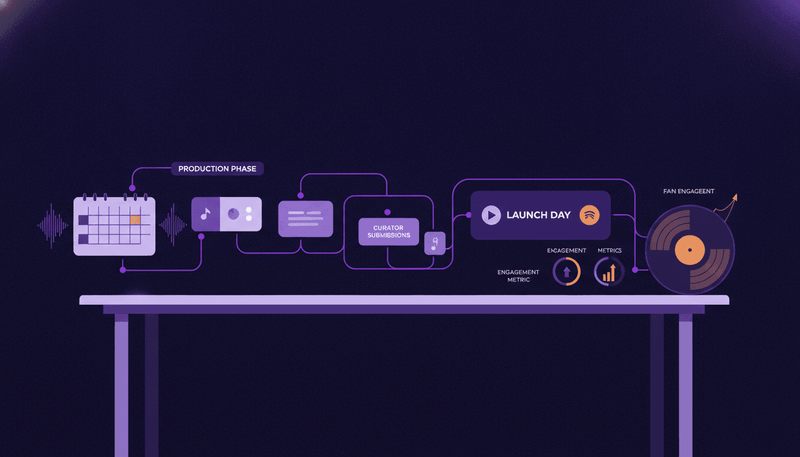
Spotify Wrapped for artists: the calendar, in one place
Five windows, in order:
- Now to November 6. Film and submit the artist message in Spotify for Artists. This is the only fixed date in the whole season.
- The week after you submit. Build the assets for Wrapped week while you still have calm hours: thank-you story frames, a top-city card, a clip of your biggest song of the year.
- Mid to late November. One hour on the profile. Artist Pick, images, bio, Canvas on your top tracks, and the pre-save page for your next single live and collecting.
- Wrapped week. Six posts across the five platforms you already use, keyed to the day the Wrapped banner appears rather than to a calendar date.
- The two weeks after. Read what moved, then decide what the January rollout looks like.
One honest note on timing. The support page that opens the submission window names one date, November 6, and does not publish a launch date for Wrapped itself. So do not build a plan that depends on knowing the exact day. Build a plan where every asset sits finished in a folder and the Wrapped-week posts sit queued, then shift the queue by a day or two when the banner shows up.
Submit your Wrapped artist message before the deadline (and what Spotify will reject)
The specs, straight from Spotify's support page. Your video must be vertical with audio, an MP4 or MOV file, at least 720 x 1280 pixels, longer than 3 seconds and shorter than 30 seconds. You submit it in Spotify for Artists on desktop: go to Video & Visuals, then the Wrapped banner, upload the video and add a caption of up to 100 characters.
Spotify suggests three things to cover: what your fans' support meant to you, a milestone from the year you are proud of, and what you cannot wait for next year. Twenty five seconds splits cleanly into that: five seconds of thanks, ten seconds on one specific moment (the show that sold out, the song that took off, the day a playlist picked it up), ten seconds teasing what comes next.
Now the part no listicle tells you. Spotify's rule for the message reads: keep it clean, no music, explicit content, logos, text, or filters. Read that again if you were planning to generate something. No music means no song under your voice. No text means no captions burned into the frame and no lyric card. No logos means no branded end slate. No filters means no treatment on your face. A generated reel, a lyric video clip or a templated story card cannot be your Wrapped message. The message is you, your phone, your voice and the room you are standing in.
The content policy adds more that gets videos pulled. Do not include watermarks from other platforms, so do not export the clip out of a video app that stamps a corner. Do not direct listeners to external websites or ticket vendors. Do not ask listeners to follow or engage with you on other platforms. Do not use Wrapped mainly to advertise something unrelated to the message. Mark the video as explicit if it contains profanity or any of the sensitive content Spotify lists. Blurry or low quality uploads can be removed too.
Two expectations to set with yourself. Spotify says submitting gives it permission to distribute your message but does not guarantee placement, and that all videos are removed once the campaign ends. So the message is a bet with a ceiling, not a channel you own. For scale on the bet, Spotify says more than 70,000 artists submitted video messages last year, that those messages engaged tens of millions of fans globally and generated hundreds of millions of views, and that fan engagement grew nearly 20% compared to 2024 Wrapped, leading to more track saves and shares. Those are Spotify's own numbers about its own feature, so treat them as a reason to spend twenty minutes filming, not as a forecast for your artist page.
Late November: the profile and release-page checks worth an hour
Wrapped sends people to your artist profile. Spend one hour making the page worth the visit.
Start with Artist Pick, because it has a shelf life most artists forget. Artist Pick sits at the top of your profile and can showcase a song, album, music video, playlist, concert or merch item. You can add an image (at least 690 x 500 px, JPEG, GIF or PNG) and a short message. Your Pick stays live for 180 days unless you change it sooner, which means the Pick you set in May is still sitting there in November, pointing at something you have stopped promoting. Swap it in late November to the track you want Wrapped traffic to land on, then swap it again after Wrapped week to the next single.
Then the rest of the hour:
- Check your artist images and bio read like the current project, not last year's.
- Make sure your social links point at accounts you actually post on, since Wrapped visitors tap through.
- Put a Canvas on the three tracks most likely to catch traffic. A looping visual on a track page costs you one short render and holds attention better than a static cover. If you have never built one, our guide on how to create a Spotify Canvas covers the format and the common upload errors.
- Get the link page for your next single published and collecting pre-saves before Wrapped week, not during it.
This is the part where a release kit pays for itself. Music24 builds the release kit and runs the rollout from one song: you add the audio, the cover and the lyrics, and it makes the stories, feed posts, countdowns, lyric cards and cover sizes in one look taken from your artwork, plus short videos like Canvas loops, AI reels and countdown videos at one video credit each. It cannot make your Wrapped message, for the reasons above. It can make every post that sits around it.
Wrapped week: what to post on each day, and on which platform
Six posts, keyed to the day Wrapped lands rather than to a date. Treat day one as the day the banner appears.
Day one: the ask. A story on Instagram and a short clip on TikTok asking fans to share their Wrapped with you tagged. Then answer every single one by hand for the rest of the day. This is the highest return hour of the whole season and it costs you nothing but attention.
Day two: your own year, as a card. One image with three numbers on it: streams, listeners, and your top city. Post it to the Instagram feed and to Threads. Fans who put you in their top five want to see they were part of something.
Day three: the song that did the work. A vertical clip over the track that carried your year, with a line about where it came from. TikTok first, then the same cut as a Reel.
Day four: the repost. Take whichever of the first three performed best and put it on YouTube Shorts and Facebook. Same asset, two more audiences, ten minutes of work.
Day five: the places. Name your top cities or countries and thank them specifically. Specific beats grateful. People screenshot their own city.
Weekend: the tease. First look at the January single, with the pre-save link. Wrapped week is the one week of the year when casual listeners are voluntarily looking at your page.
Mind your posting limits while you plan this. Music24's Free plan schedules 10 posts a month on 1 channel, Artist does 60 on 3, and Pro does 200 on all 5 (TikTok, Instagram, YouTube, Facebook and Threads). Six Wrapped-week posts across five platforms is a Pro-shaped week. When a platform needs a tap from you to publish, the post arrives ready to share on your phone.
Turn the Wrapped spike into pre-saves for your next single
A Wrapped spike decays in days. A pre-save does not.
Publish the link page for your January single before Wrapped week starts, so every post in that week has somewhere to send people. Fans pre-save on Spotify, Apple Music, Deezer and more, and on release day the page flips to Listen now. On Music24's Free plan you publish up to 3 of those pages and they carry the Music24 badge. Paid plans publish without a limit, drop the badge, export the fans who pre-saved so you can email them, and add pre-save subscriptions so your next release lands in their library automatically. If you have never built a campaign around one, start with our guide to Spotify pre-save campaigns.
The sequence that converts: day one you ask for Wrapped screenshots, day five you thank the top cities, the weekend you tease the single with the pre-save link, and your Artist Pick changes to that single the Monday after. Four touches, one destination.
Read your own year instead of guessing at it
Wrapped gives you a slide. It does not give you the year.
If you want to know which post moved which day, you need history, and history only exists if something was keeping it. Spotify for Artists holds your streams, listeners, saves and playlist adds, and reading it properly is a skill: our walkthrough on how to read Spotify for Artists stats covers the panels that actually matter. The gap most independent artists hit is stitching those numbers to the posts that caused them.
That is the job Music24's analytics does: it connects the accounts you already have (Spotify for Artists, Deezer for Creators, YouTube, your social accounts, plus link clicks and pre-saves) and reads them daily into one view, with each post sitting next to the streams of the day it went out. The limit worth knowing before you choose a plan: history runs 7 days on Free, 90 days on Artist and 365 days on Pro. Seven days of history in December tells you nothing about your year. Connect now and next December you will be reading your year instead of guessing at it.
What to measure in the two weeks after Wrapped
Three numbers, compared across three windows: the week before Wrapped, Wrapped week, and the two weeks after.
- Followers gained. Wrapped traffic that follows you stays reachable through Release Radar. Traffic that streams once and leaves does not.
- Saves and playlist adds on the track you pointed at. This tells you whether your Artist Pick and your day three clip sent people to the right song.
- Link clicks and pre-saves on the January single. This is the only number that converts December attention into a January release day.
Write the three windows down in a note with the six posts next to them. If the top-city card outperformed the clip, make two cards next year and one clip. That one page of notes is worth more than any Wrapped recap post you could read.
Start the season without paying for it
Film the artist message this week, because November 6 does not move. Then let something else build the twelve posts around it.
Signing up for Music24 with email, Apple or Google takes no card and starts 7 days of the Pro plan, which comes with 15 video credits. After the 7 days your account moves to the Free plan and stays there as long as you like, with nothing charged. Be clear-eyed about the one limit that matters in Wrapped season: on the trial and on Free, every image and video renders as a low-resolution preview with a watermark, so you can see the whole Wrapped-week campaign laid out and planned before you pay, and you cannot post those previews as they are. Start free and plan your Wrapped week, then decide.
FAQ
Does submitting an artist message mean fans will see it in their Wrapped? No. Spotify says submitting gives it permission to distribute your message, but submission does not guarantee placement.
Can I put my own song underneath the video? No. Spotify's rule for artist messages bans music, along with explicit content, logos, text and filters. Your video needs audio, so it is your voice and your room, not a backing track.
Where exactly do I upload it? In Spotify for Artists on desktop. Open Video & Visuals, find the Wrapped banner, submit the video and add a caption of up to 100 characters.
Does my Wrapped message stay on my profile afterwards? No. Spotify says all videos are removed once the campaign ends, so treat it as a seasonal placement and keep your own copy of the file for your socials.
What if my message needs an explicit marker? Mark it. Spotify asks you to flag profanity, violence, drug references, sexual content and other sensitive material, and recommends erring on the side of caution when you are unsure.
I missed November 6. Is the season lost? No. The message is one of roughly a dozen moves here. The profile refresh, the Artist Pick swap, the six Wrapped-week posts and the pre-save page for your next single all still work, and all of them sit in your control rather than Spotify's.
Get your music heard. Skip the content grind.
Add a song. Music24 makes the posts and the videos, plans your release and publishes it on every channel. Free for 7 days on the Pro plan, no card.